
We offer an IoT solution for temperature monitoring that enables seamless integration between the Raspberry Pi Pico W (hereinafter referred to as “Pico W”) and smartphone apps (iPhone and Android) through advanced BLE (Bluetooth Low Energy) communication. ( iPhone App Explainer Video )
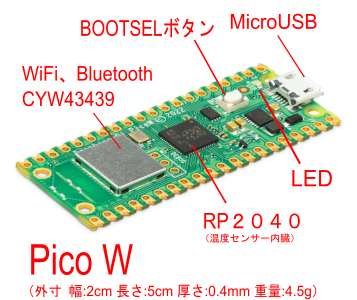
The Pico W is an inexpensive (about 1,500 yen) off-the-shelf microcontroller board equipped with the CYW43439 wireless chip, which provides Wi-Fi and Bluetooth communication capabilities.
The Pico W comes equipped with free firmware developed by our company (available for download from GitHub).
We also developed our own smartphone app, which is available for free download from the App Store and Google Play. (Some features are paid.)
The Pico W is an ultra-compact microcontroller board equipped with the “RP2040,” a high-performance microcontroller chip developed in-house by the Raspberry Pi Foundation, and comes standard with 2.4 GHz Wi-Fi and Bluetooth 5.2 wireless communication capabilities.
 |
For inquiries regarding IoT solutions, please contact us at the address below.
The main features are:
- Real-Time Temperature Monitoring (Integrated with Advertisements)
Simply launch the app, and it will receive the advertisement data (temperature readings) transmitted by the Pico W and display them on the screen.
You can check the current temperature reading on your smartphone screen without having to go through the pairing process.
You can monitor temperature readings from multiple Pico W units simultaneously. (The Pico W units are displayed by their configured device names.) - Settings for the Pico W
You can easily configure the Pico W’s device name (identifier), measurement interval (in minutes), reference voltage value, temperature monitoring status, and LINE notification settings via the smartphone app.
The temperature sensor built into the Pico W’s RP2040 is not designed for precise temperature measurement. There may also be variations between individual units. Please adjust it by changing the reference voltage (3.3V).
Since the settings are stored in the Pico W’s flash memory, they will not be lost even if the power is turned off.
You can turn the LED on the Pico W on and off. - Temperature Data Logging
The Pico W measures temperature at specified intervals and records the readings in memory.
Up to 1,024 data points can be recorded. If the measurement interval is set to 10 minutes, the device can record temperature data for approximately 7 days. If the number of data points exceeds 1,024, the oldest data will be overwritten.
Each data entry consists of the measurement date and time (year, month, day, hour, minute, second) and the measured temperature value.
Since the Pico W does not have a system clock, the measurement date and time are generated by the Pico W’s firmware, which increments the count based on the system time (year, month, day, hour, minute, and second) from the smartphone app when the Pico W is connected to it.
You can check the number of records currently stored using the smartphone app.
Please note that if the power is turned off, the recorded data will be lost. - Downloading Temperature Data
In response to a download request from a smartphone app, the temperature measurement data recorded by the Pico W is downloaded via BLE communication and saved as a file on the smartphone.
The file name will be year-month-day-hour-minute-second.txt (based on the year, month, day, hour, minute, and second when the file was downloaded).
Downloaded files are displayed in a list (sorted by date), so you can view them on the screen or use the sharing features to send them as email attachments or sync them with the Numbers app.
There is also a delete function, so please delete any unnecessary files. - If a temperature anomaly occurs, the Pico W can send a LINE notification.
However, to use this feature, you’ll need a Wi-Fi connection and to complete additional procedures, such as obtaining a LINE API URL. - Multilingual Support
The smartphone supports Japanese, English, Simplified Chinese, and Korean, and you can switch between them in the settings menu. - Other
The smartphone screen automatically switches between Light Mode and Dark Mode, but you can also switch between them manually.
Recommended for people like this
- For those who wish to monitor changes in ambient temperature (in greenhouses, laboratories, etc.)
- For those who want to check the temperature in their home
For those who want to check the temperature in the room where their pet is while they’re away
For those who want to check the temperature inside the refrigerator (You can check the temperature in real time if you use an airtight case to prevent condensation. A portable power source is required.) - For those looking for a portable temperature data logger that uses BLE communication
- Anyone who is operating a homemade temperature measurement system using the Pico W
To use this service, you will need the following items.
- The Pico W requires free firmware developed by our company.
The firmware (src_templogger.uf2) is available on GitHub.
Go to the SRC-Pico-W-firmware repository on GitHub (Firmware Downloads) and click the “Download raw file” button to the right of src_templogger.uf2. The src_templogger.uf2 file will be downloaded.
Connect your computer to the Pico W using a micro USB cable, and copy the downloaded file (src_templogger.uf2) to the Pico W. (Video showing how to copy files to the Pico W) - To power the Pico W using a standard household outlet, you will need a “USB Type-A to Micro-B (Micro USB)” cable and a standard 5V USB power adapter (2A output) sold separately.
- To use BLE communication, your smartphone must have Bluetooth version 5.0 or later.
- Please use the QR code below to install the smartphone app.
|
|

Please direct any inquiries to the contact information below.